


 Become a Superstar! “Using the /Scoreboard Command to Set a Time Limit!”
 Become a Superstar! “Using the /Scoreboard Command to Set a Time Limit!”
How to Set Up the Command Blocks
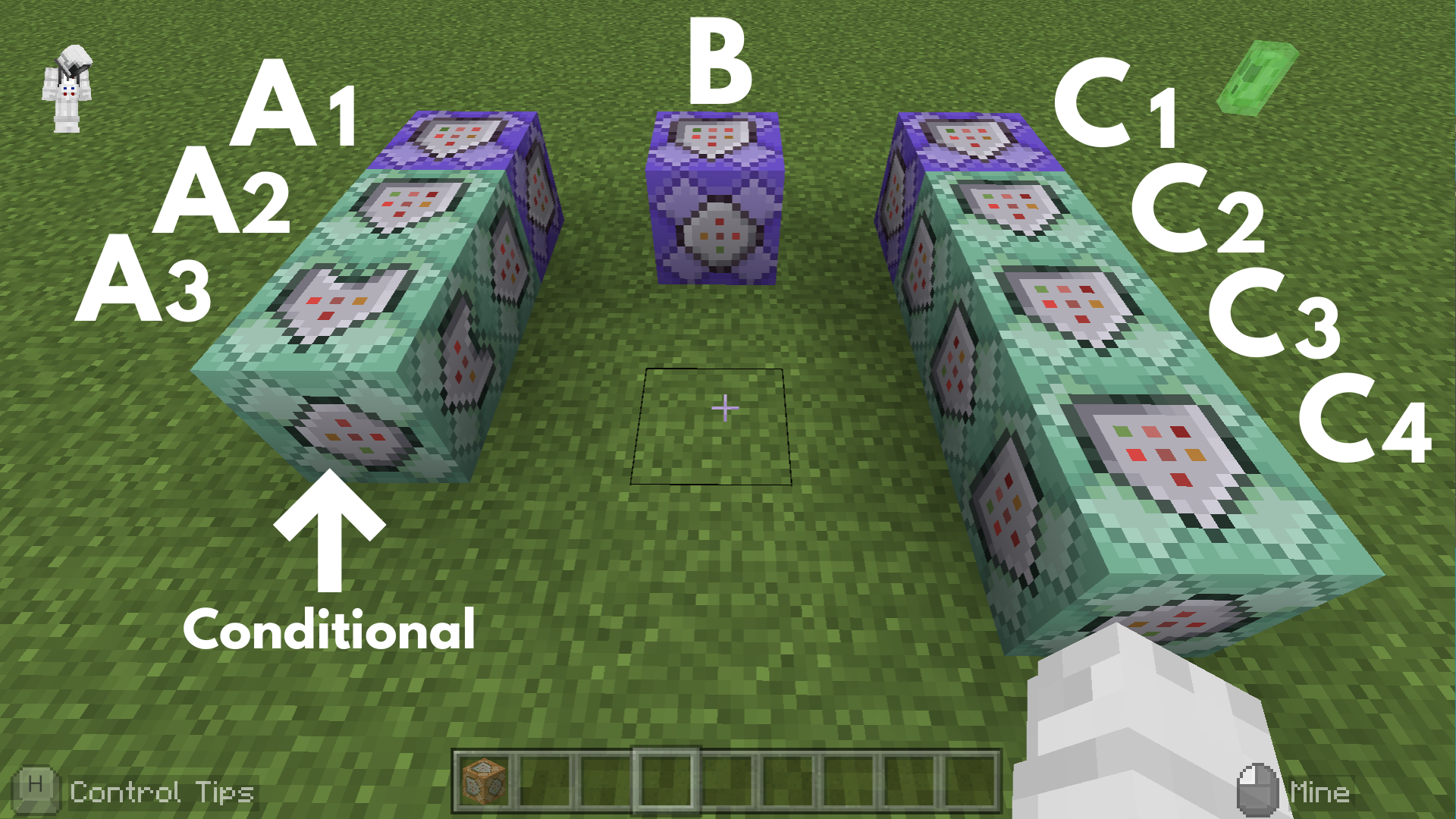
Command entered in the Command Block:
Command Block A1
 Block Type: Repeat / Redstone: Always Active
/scoreboard objectives add star dummy
➡️ This allows the game to track the “star” score for each player and use it to apply effects or conditions.
Command Block A2
 Block Type:Chain / Redstone: Always Active
/execute as @a at @s if entity @e[name="Nether Star",r=2] run scoreboard players set @s star 20
➡️ When a player gets close to a Nether Star, their “star” score is set to 20, starting the Superstar countdown.
Command Block A3
Block Type:Chain / Conditional / Redstone: Always Active
/kill @e[name="Nether Star"]
➡️ This ensures the Nether Star is removed after the star score is set to 20.
Command Block B
Block Type: Repeat / Redstone: Always Active (Delay in Ticks: 20)
/execute as @a[scores={star=1..}] at @s run scoreboard players add @s star -1
➡️ This makes the mooshroom slowly approach the nearest mob.
Command Block C1
Block Type: Repeat / Redstone: Always Active
/execute as @a[scores={star=1..}] at @s run effect @s speed 1 10 true
➡️ The result: The player’s movement speed is increased while they are in Superstar mode.
Command Block C2
Block Type:Chain / Redstone: Always Active
/execute as @a[scores={star=1..}] at @s run effect @s jump_boost 1 2 true
➡️ This increases the player’s jump strength while they are in the superstar state.
Command Block C3
Block Type:Chain / Redstone: Always Active
/execute as @a[scores={star=1..}] at @s run particle minecraft:crop_growth_emitter ~~1~
➡️ This allows you to represent the appearance of the superstar state.
Command Block C4
Block Type:Chain / Redstone: Always Active
/execute as @a[scores={star=1..}] at @s run kill @e[family=mob,r=1]
➡️ This allows a player in the superstar state to defeat nearby hostile mobs.
Minecraft: Education Edition is a version of Minecraft specifically designed for educational use. It aims to help students develop skills in creative problem-solving, collaboration, and communication. A key feature is the ability to learn programming through tools like MakeCode and Python. It also provides specialized features for the classroom, including teacher management tools, lesson plans, and educational content.