


 Black Hole Command! “Using Selector Condition Filters to Specify Command Targets!”
 Black Hole Command! “Using Selector Condition Filters to Specify Command Targets!”
How to Set Up the Command Blocks
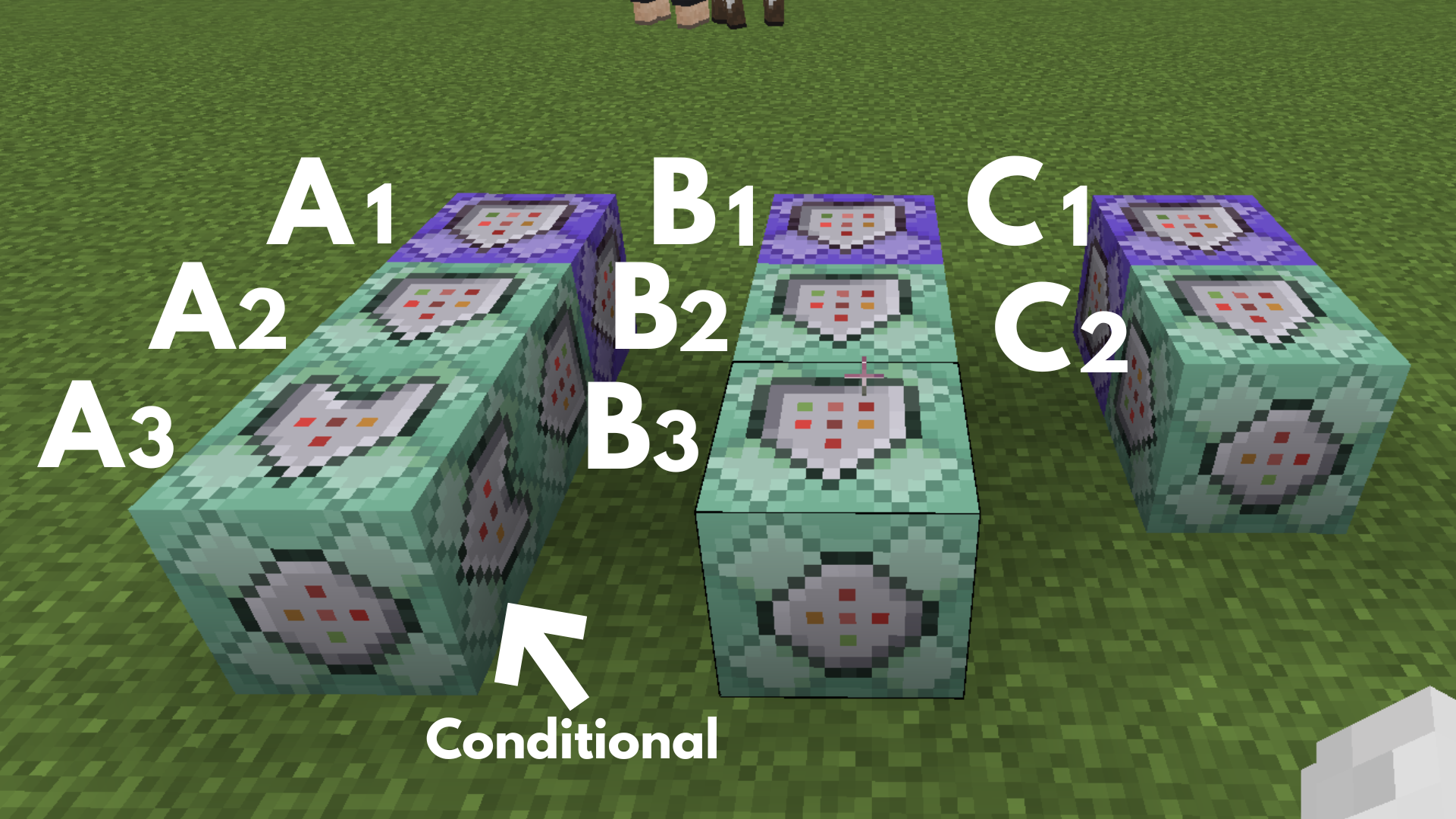
Command entered in the Command Block:
Command Block A1
 Block Type: Repeat / Redstone: Always Active
/execute as @e[type=splash_potion] at @s run kill@e[type=armor_stand]
➡️ This removes the previously existing armor stand so that the subsequent processing can be carried out correctly.
Command Block A2
 Block Type:Chain / Redstone: Always Active
/execute as @a at @s if entity @e[name="Nether Star",r=2] run scoreboard players set @s star 20
➡️ This makes the armor stand appear at that location only when the splash potion hits the ground.
Command Block A3
Block Type:Chain / Conditional / Redstone: Always Active
/kill @e[type=splash_potion]
➡️ This causes Command Block A2 to succeed, and the potion is removed immediately after it hits the ground and the armor stand is summoned.
Command Block B1
Block Type: Repeat / Redstone: Always Active (Delay in Ticks: 20)
/execute as @e[type=armor_stand] at @s run tag @e[family=mob,rm=0.1,r=20] add target
➡️ This allows you to mark the mobs around the armor stand as targets.
Command Block B2
Block Type:Chain / Redstone: Always Active
/execute as @e[tag=target] at @s run tp @s ^1^^0.2 facing @e[type=armor_stand]
➡️ This makes the mobs move as if they are being pulled in while rotating around the armor stand.
Command Block B3
Block Type:Chain / Redstone: Always Active
/execute as @e[type=armor_stand] at @s run kill @e[tag=target,r=2]
➡️ This causes mobs that approach the armor stand to be defeated as if they were being sucked into a black hole.
Command Block C1
Block Type: Repeat / Redstone: Always Active
/effect @e[type=armor_stand] invisibility 1 1 true
➡️ This makes the armor stand invisible, allowing you to create an effect where the true form of the black hole cannot be seen.
Command Block C2
Block Type:Chain / Redstone: Always Active
/execute as @e[type=armor_stand] at @s run particle minecraft:evoker_spell ~~~
➡️ This creates a magical effect from the invisible armor stand, enhancing the black hole illusion.
Minecraft: Education Edition is a version of Minecraft specifically designed for educational use. It aims to help students develop skills in creative problem-solving, collaboration, and communication. A key feature is the ability to learn programming through tools like MakeCode and Python. It also provides specialized features for the classroom, including teacher management tools, lesson plans, and educational content.