


 Iceball spell Command! “Using the Placement Mode of the /setblock Command!”
 Iceball spell Command! “Using the Placement Mode of the /setblock Command!”
How to Set Up the Command Blocks
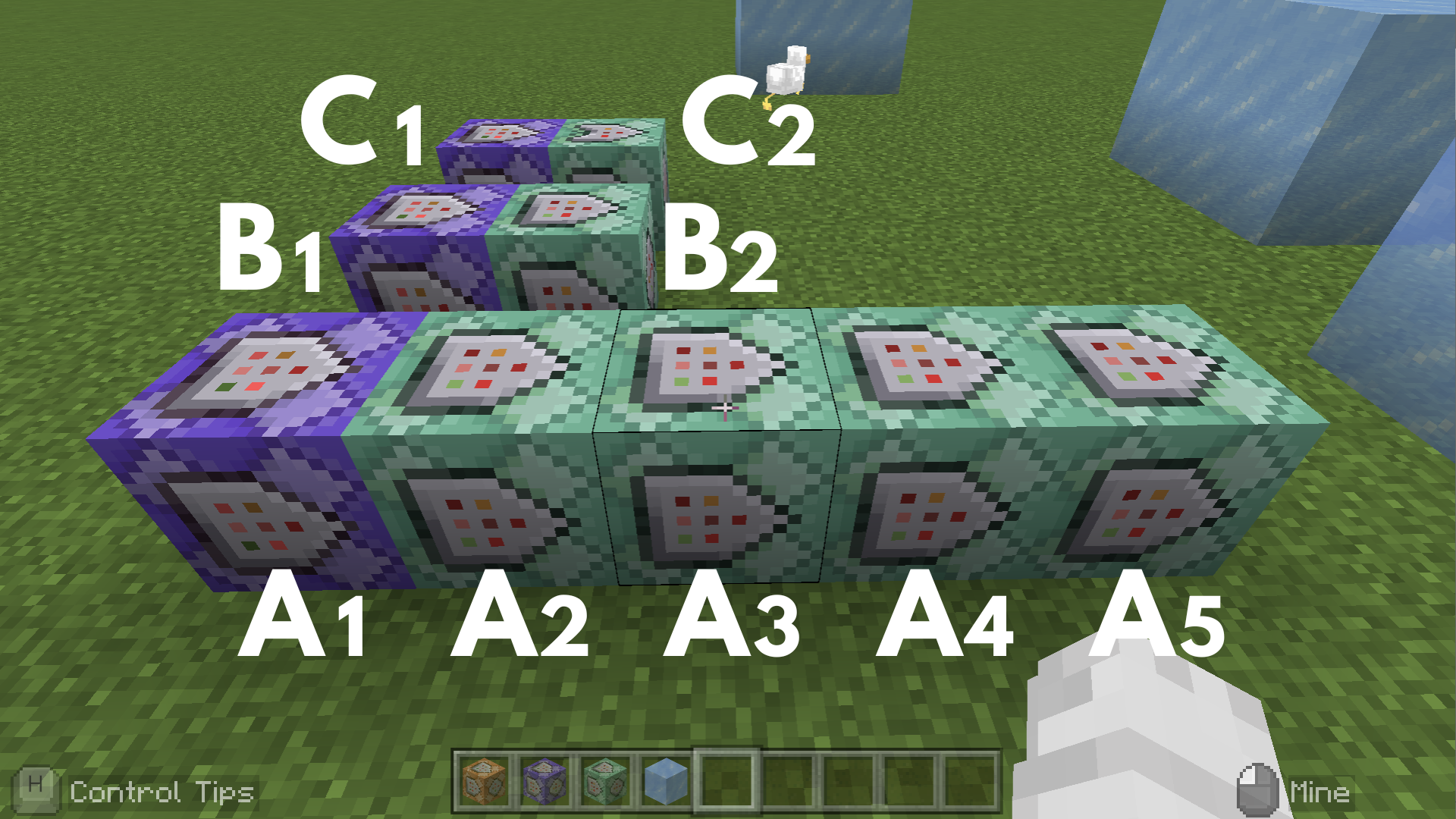
Command entered in the Command Block:
Command Block A1
 Block Type: Repeat / Redstone: Always Active
/scoreboard objectives add count dummy
➡️ This allows you to record the number of times the ice has moved.
Command Block A2
 Block Type:Chain / Redstone: Always Active
/execute as @e[name="Ice"] at @s if block ~~-1~ air run tp ^^-1^0.5
➡️ This recreates a movement where the ice appears to slide down through the air. Commands A2 and A3 together make the ice fly forward, gliding over the ground.
Command Block A3
Block Type:Chain / Redstone: Always Active
/execute as @e[name="Ice"] at @s unless block ~~-1~ air run tp ^^1^0.5
➡️ This makes the ice appear to jump or fly over the ground. Commands A2 and A3 together make the ice fly forward, gliding over the ground.
Command Block A4
Block Type:Chain / Redstone: Always Active
/execute as @e[name="Ice"] at @s run fill ~~~ ~~~ ice replace air
➡️ This creates a path of ice where the iceball passes.
Command Block A5
Block Type:Chain / Redstone: Always Active
/execute as @e[name="Ice"] at @s if block ~~~ ice run setblock ~~~ air destroy
➡️ This displays the destruction effects (sound and particles) when the ice block is destroyed.
Command Block B1
Block Type: Repeat / Redstone: Always Active
/scoreboard players add @e[name="Ice"] count 1
➡️ This prevents the ice from moving forever and automatically stops the process.
Command Block B2
Block Type:Chain / Redstone: Always Active
/kill @e[name="Ice",scores={count=50..}]
➡️ This prevents the ice from moving forever and automatically stops the process.
Command Block C1
Block Type: Repeat / Redstone: Always Active
/execute as @e[name="Ice"] at @s as @e[family=mob,r=2] at @s run fill ~1~1~1 ~-1~-1~-1 ice keep
➡️ This creates an effect where the mob is encased in ice when the iceball touches it.
Command Block C2
Block Type:Chain / Conditional / Redstone: Always Active
/kill @e[name="Ice"]
➡️ This means the ice block will disappear after the mob has been encased in ice (C1 succeeded).
Minecraft: Education Edition is a version of Minecraft specifically designed for educational use. It aims to help students develop skills in creative problem-solving, collaboration, and communication. A key feature is the ability to learn programming through tools like MakeCode and Python. It also provides specialized features for the classroom, including teacher management tools, lesson plans, and educational content.